Table of Contents
Here’s the article with 5 new prompts, following the same format and your saved preferences:
A recruiter on LinkedIn recently posted that she filled three roles in one week using nothing but five AI prompts she had saved in a doc.
No paid tools, no fancy software. Just prompts she reused over and over.
That’s the real value of good AI prompts for recruiters, they cost nothing, reusable, and once you’ve written them well, you never have to start from scratch again. Here are 5 worth saving today.
Why These AI Prompts for Recruiters Are Worth Saving
These aren’t the flashiest prompts out there.
They’re the ones recruiters actually use daily, across almost every role they fill, regardless of industry or seniority level.
Save these once, tweak the brackets each time, and you’ll cut hours off your weekly admin work.
What Makes a Good Recruiting Prompt
A strong prompt does three things: it gives context (the role, the stage, the situation), it sets clear formatting rules (length, tone, structure), and it tells the AI what to avoid.
Skip any of those three, and you’ll get something that reads like every other AI-generated email candidates have already seen a dozen times.
Every prompt in this list follows that structure. Copy them as-is, then fill in your specific details.
1. Prompt for Candidate Follow-Up Reminder Email
When To Use
For nudging candidates who went quiet mid-process without sounding pushy.
Copy Prompt
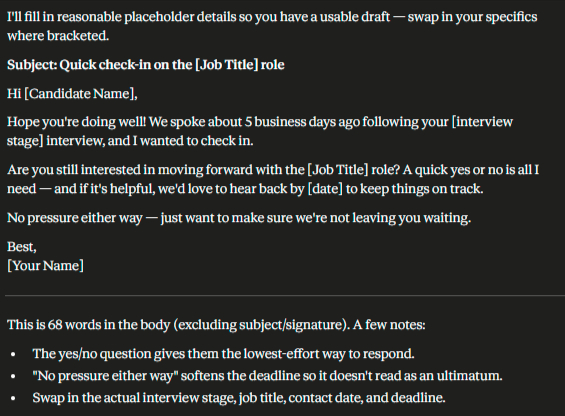
Write a short follow-up email to a candidate who has gone quiet during the [interview stage] stage of the hiring process for a [job title] role.

Context: [last contact date, e.g., "last spoke 5 business days ago"]

Reason for follow-up: [e.g., checking on interest, confirming next steps, deadline approaching]

Requirements:

- Under 70 words

- Friendly, not passive-aggressive or guilt-inducing

- Give them an easy, low-effort way to respond (e.g., a simple yes/no question)

- Include a soft deadline if relevant: [date, if applicable]

- Avoid phrases like "just circling back" or "per my last email"Output:
2. Prompt for Skills-Based Screening Call Script
When To Use
For structuring a 15-20 minute phone screen so it stays consistent across candidates.
Copy Prompt
Create a 15-20 minute phone screening call script for a [job title] role.

Must-have skills to verify: [list 3-5]

Logistics to confirm: [salary expectations, availability/notice period, location/remote requirements, work authorization]

Structure the script in this order:

1. Opening (30 seconds, sets expectations for the call)

2. 4-5 skills-verification questions tied directly to the must-haves listed

3. 2-3 logistics questions

4. Closing script explaining next steps and timeline

Write the questions as a script the recruiter can read near-verbatim, not just bullet topics.
Output
3. Prompt for Reference Check Question Set
When To Use
For reference calls that need to go beyond “would you rehire them?”
Copy Prompt
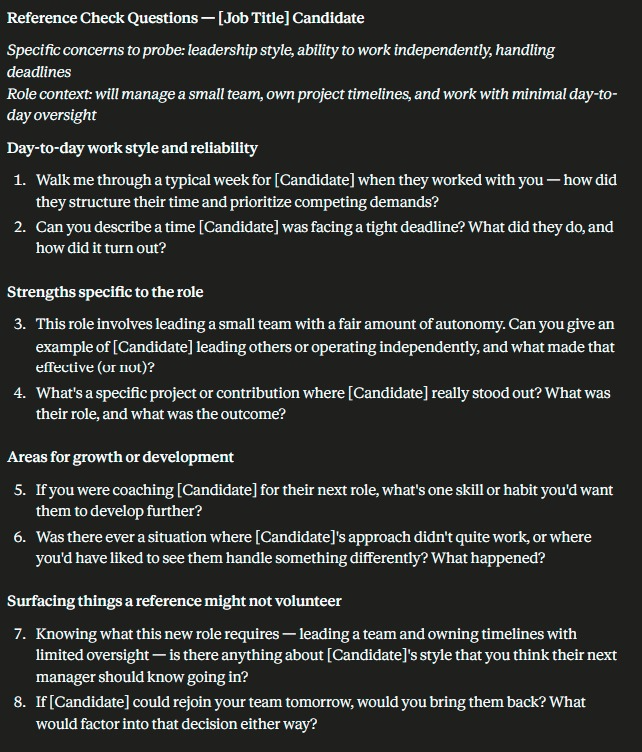
Create a reference check question set for a [job title] candidate.

Specific concerns to probe (if any): [e.g., leadership style, ability to work independently, handling deadlines]

Role context: [what this person will be responsible for in the new role]

Provide 8 questions total:

- 2 questions on day-to-day work style and reliability

- 2 questions on strengths specific to the role context given

- 2 questions on areas for growth or development

- 2 questions designed to surface anything a reference might hesitate to volunteer unprompted

Phrase questions to encourage specific examples, not yes/no answers.Output:
4. Prompt for Candidate Experience Survey
When To Use
For collecting honest feedback from candidates after they go through your hiring process.
Copy Prompt
Create a 5-question candidate experience survey to send after the hiring process is complete, regardless of outcome (hired or rejected).

Cover these areas:

1. Clarity of communication throughout the process

2. Speed/timeliness of the process

3. Quality and fairness of the interview experience

4. One open-ended question for honest improvement suggestions

5. Likelihood to recommend the company to others (1-10 scale)

Keep the survey short enough to complete in under 3 minutes. Write a 2-sentence intro explaining why their feedback matters, regardless of whether they were hired.
Output
5. Prompt for New Hire Onboarding Welcome Email
When To Use
For sending a warm pre-start email once a candidate accepts an offer.
Copy Prompt
Write a welcome email to send to a new hire after they've signed their offer letter, before their first day.

Details to include:

Start date: [date]

First-day logistics: [time, location/remote login info, who they'll meet]

Anything to prepare/bring: [list, if applicable]

Who is sending this: [recruiter name/title]

Requirements:

- Warm and genuinely welcoming tone, not just transactional logistics

- Under 150 words

- Include one specific, personal line about why the team is excited to have them (tie it to something from their background if possible: [insert detail])

- End with an open invitation to reach out with questions before day oneOutput:

How to Actually Use These Prompts Day to Day
Saving five prompts in a doc only helps if you actually open that doc.
Build them into your workflow at the exact moment you need them, drop the follow-up prompt into your calendar reminder for stalled candidates, paste the screening script prompt into your interview prep checklist.
Tweak the wording slightly each time so it doesn’t feel copy-pasted. Small changes; a name, a specific detail about the candidate, a reference to something from their resume, make a templated prompt feel personal again.
The Real Value of Having These AI prompt
These five free AI prompts for recruiters cover the stretches of the hiring process that often get the least attention — follow-ups, references, candidate feedback, onboarding.
They’re not complicated. That’s the point.
Save them in a doc, swap the brackets each time, and you’ll have consistent, professional communication ready in minutes instead of starting from scratch every time.
The recruiters getting the most out of AI right now aren’t using the fanciest tools. They’re just using better prompts, more consistently, across every single hire.
FAQ Section
What are the best free AI prompts for recruiters?
Follow-up emails, screening scripts, reference checks, candidate surveys, and onboarding emails — the recurring tasks every recruiter handles weekly.
Do I need a paid AI tool to use these prompts?
No. Free versions of ChatGPT or Claude work fine for all five.
How often should recruiters update their saved prompts?
Whenever your process changes — new interview stages, new tools, or new company messaging.
Can these prompts work for any industry?
Yes. Swap the job title and skill details, and the structure stays the same.
Why does candidate experience feedback matter for recruiters?
It flags weak points in your process early, before they affect your employer brand or offer-acceptance rates.
Is a reference check script really necessary?
Yes. Without one, reference calls tend to default to vague, low-value questions.